

Prompt Variables
Variables are placeholders in your prompt text that Raita replaces at generation time.
Write them as {variableName} anywhere in a prompt field.
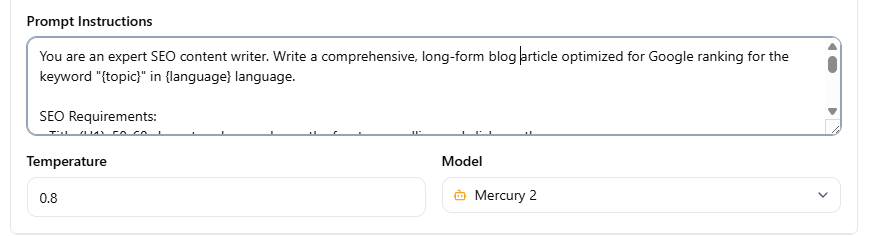
Common Variables (all modes)
| Variable | Replaced with |
|---|---|
{topic} | The Article Worker's topic field |
{keyword} | Same as {topic} (alias) |
{niche} | The worker's niche field |
{language} | The worker's language field |
{topicQueryParam} | URL-encoded version of {topic} (used in search macros) |
Blaze Mode Variables
These are only available in Blaze mode prompts, and only at the stage where they are generated:
| Variable | Available in | Replaced with |
|---|---|---|
{title} | Detail, Meta, Opening, Closing | Generated title |
{lsi} | Detail | Generated section list (newline-separated) |
{outline} | Detail | Same as {lsi} — full outline text |
{section} | Detail | Current section heading being generated |
{subtopic} | Detail | Current subtopic |
{index} | Detail | Section index number (0-based) |
{item} | Detail | Current item from outline |
{internal_links} / {internalLinks} | Detail | Generated internal link HTML |
Compose Mode Variables
| Variable | Replaced with |
|---|---|
{title} | Generated title (if title prompt set) |
{index} | Section index number (0-based) |
{internalLink} | One internal link from the target list |
{random5InternalLink} | 5 randomly selected internal links |
{chain} | All previously generated sections (sequential mode only) |
Special Flags
| Flag | Effect |
|---|---|
{debug} | (Simple mode only) Return the injected prompt text without calling the AI |
{webSearch} | Enable web search for this prompt (provider-dependent — see AI Provider Setup) |
{imagegen} | Trigger image generation for this article |
Tips
- Variables are case-sensitive:
{topic}works,{Topic}does not - Variables that can't be resolved are left as-is in the prompt (e.g. if
{title}is used before title generation runs) {internalLinks}that reach the scraper layer unresolved are stripped automatically